If you've started setting up SMS campaigns, you've probably run into the term Sender ID somewhere along the way. It usually shows up right when you're trying to send your first message and the platform asks you to verify your business before anything goes out. A Sender ID is the identity that carriers attach to your outgoing messages. It's how mobile networks confirm that a real, registered business is behind a text rather than an anonymous source blasting out spam.
Most business owners have never had to think about how carriers decide which messages to deliver and which ones to quietly drop. Until recently, that decision happened entirely behind the scenes. Now that texting has become one of the primary ways companies reach customers, carriers have built an entire verification layer around it, and the Sender ID sits at the center of that system.
Without a registered Sender ID, your messages are far more likely to be filtered, delayed, or blocked outright. Carriers use this registration to track delivery quality over time and to protect their networks from the kind of unsolicited bulk texting that gives SMS a bad name.
Why a Sender ID matters more than people expect
It's tempting to treat Sender ID registration as a formality, something to click through as fast as possible on the way to sending an actual campaign. In practice, it's one of the biggest factors in whether your messages land in front of customers at all.
Carriers track the delivery history attached to every Sender ID. A registered, verified ID builds a track record over time. Send consistently, keep your opt-out rate low, and avoid spam-like behavior, and that history works in your favor as your volume grows. Skip registration, and you're sending into a system that has every reason to treat your traffic with suspicion.
There's also a reputation effect that most people don't think about until it bites them. If an unregistered number sends a burst of messages, carriers may throttle that number across the board, even for messages that have nothing to do with the flagged content. A verified Sender ID insulates you from that kind of collateral filtering.
Tip: Carriers don't just check your Sender ID once at signup. They keep evaluating it based on ongoing delivery behavior, so what you do after approval matters just as much as the approval itself.
What you actually need to register
Getting a Sender ID approved comes down to proving your business is real, accountable, and reachable. Carriers aren't asking for anything exotic here. They want the basic information any legitimate business should already have on hand.
- Business registration documents: Proof that your company is a legally recognized entity, such as an LLC, Corporation, Ltd, or equivalent structure depending on your country.
- A working business website: A live site that clearly shows your business name, what you offer, and a way to contact you. Carriers will check this during review.
- Accurate, consistent business details: Your business name and information need to match across your registration paperwork and your website. Mismatches are one of the most common reasons approval gets delayed.
What the registration process actually looks like
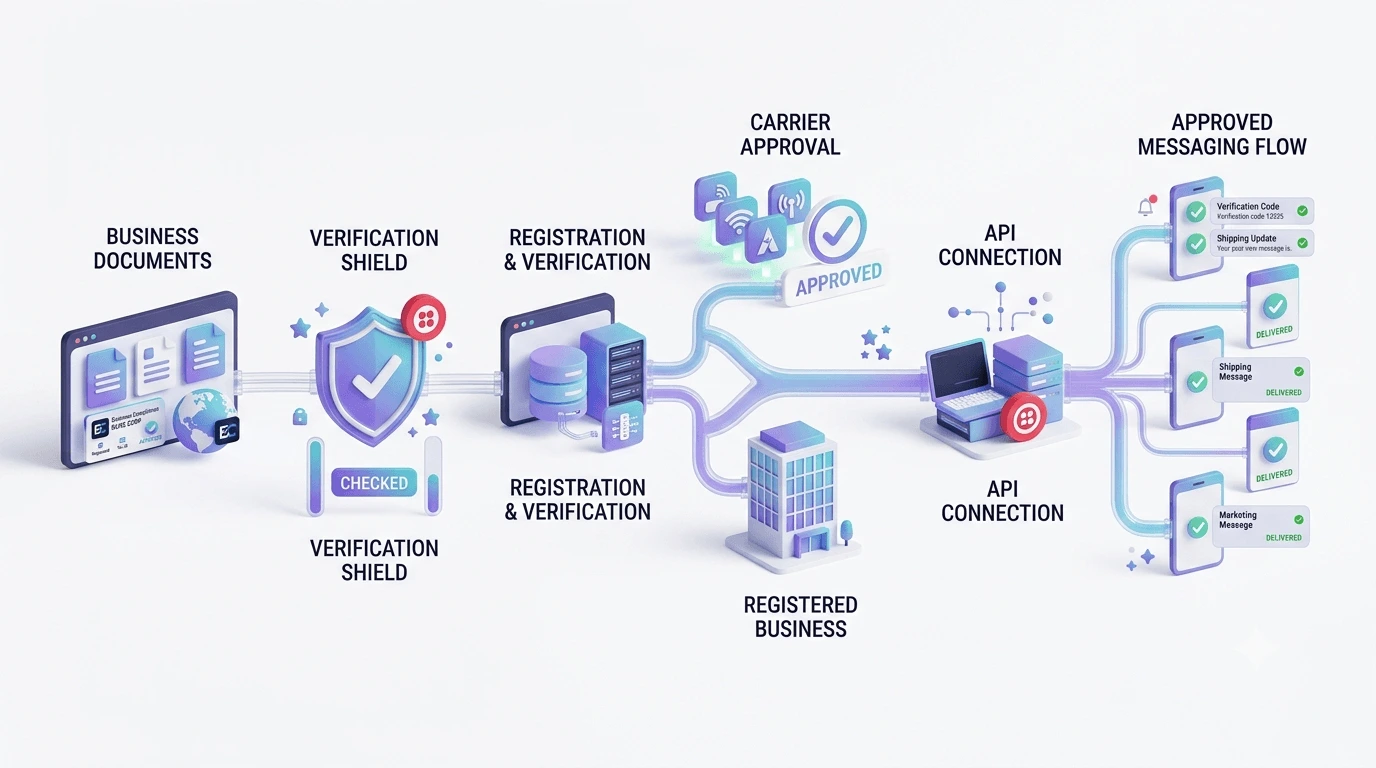
In most cases, you're not dealing directly with a carrier. You're submitting information through your messaging platform, which then forwards it to the registries that carriers rely on for verification. That submission gets reviewed, matched against public business records where possible, and either approved or sent back with a request for more detail.
Approval timelines vary. Some businesses get cleared within a day or two. Others wait longer, usually because something in the submitted information doesn't quite line up, like a business name on the website that doesn't exactly match the legal name on file. Getting the details consistent from the start is the single best way to avoid back-and-forth delays.
- Submit your business details: Provide registration documents, contact information, and your website during onboarding.
- Wait for verification: Your information is checked against business registries and carrier databases for accuracy.
- Receive your registered Sender ID: Once approved, your Sender ID is attached to your account and ready to use across all future campaigns.
How MK TextBiz handles registration
MK TextBiz collects the required business information directly during onboarding, so your Sender ID registration gets submitted correctly the first time instead of bouncing back and forth over missing or mismatched details.
Once approved, that Sender ID stays attached to your account. Every campaign you send afterward inherits the same trusted, verified status, so you're not re-registering or re-proving your business each time you launch a new campaign.